
Powervox excited to announce a major feature upgrade for all users: the Follow-Up Work Queue. This new workspace completely transforms how your dental practice handles follow-ups by turning passive AI call logs into active, trackable tasks. If a patient leaves a voicemail, experiences a dropped call, or asks a complex clinical question, the system immediately flags the interaction so your human team can step in and close the loop.
Previously, staff members would simply mark a call as "Reviewed" after reading or listening to the AI receptionist's interaction with a patient. While this confirmed the call was seen, it created an operational gap where critical patient needs were easily forgotten during a busy shift. The new Follow-ups feature significantly improves the passive "Reviewed" status with a shared task manager driven directly by your AI receptionist.
This launch shifts Powervox from a standard automated answering service into an operational productivity tool. By providing a dedicated environment to manage handed-off work, the feature ensures your front desk can maintain clear accountability and prevent patient acquisition leaks.
Why this matters
When a front-desk team treats an AI receptionist as a total crutch, unreturned calls accumulate, and patient satisfaction drops. The work that an AI cannot fully complete (such as addressing post-op clinical concerns) must be cleanly handed off to staff.
Without a structured queue, these high-value tasks become invisible. The Follow-Up Work Queue solves this problem by surfacing unfinished business into a centralized interface. By making this work visible and assignable, practice owners and office managers can ensure that callbacks are actually getting done, protecting the practice from patient churn and unfilled chairs.
How it works in practice
The Follow-ups feature functions as a shared master-detail workspace that structures the entire lifecycle of a patient callback. A follow-up task is generated in one of two ways:
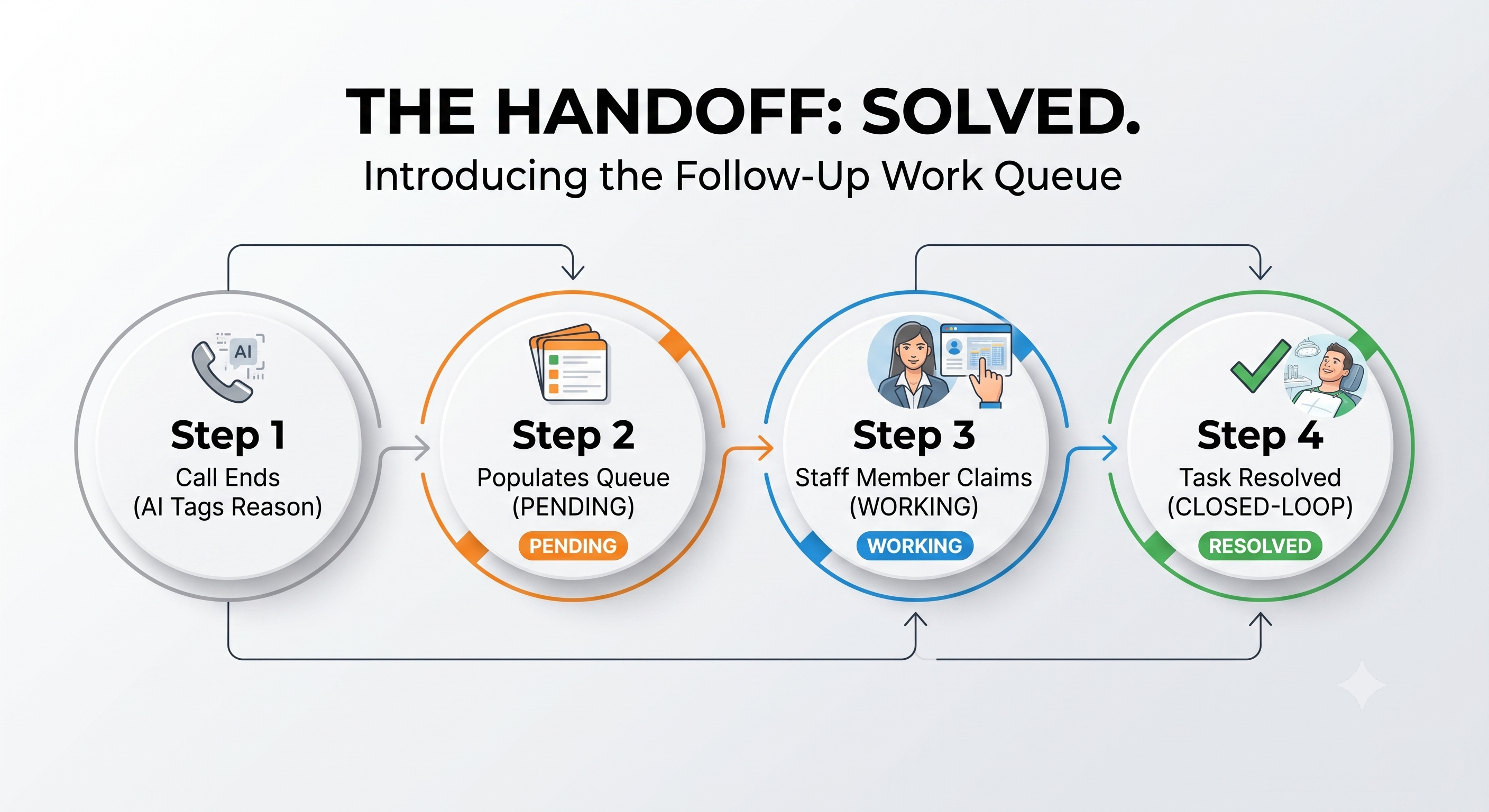
Auto-generated at call end: The system automatically creates a task based on the call's final disposition and workflow tags (such as a voicemail, call fallout, transfer, incomplete cancellation/reschedule, or a post-op concern).
Manually flagged by staff: If a team member reviews a conversation in the admin app and notices an issue that requires future action, they can manually flag the call to generate a task.
Once a task enters the queue, it moves through a specific status lifecycle to track accountability:
Pending: Open and unclaimed by staff.
Claimed: Open and explicitly assigned to a specific user.
Working: Open and actively being worked on by a team member.
Resolved / Complete / Canceled: Closed states indicating the patient's need was fully addressed or resolved.
What to evaluate before choosing a solution
When analyzing how to manage your practice's patient handoffs, look for concrete workflow capabilities rather than generic software features:
Workflow fit: Does the solution provide a comprehensive workspace with internal notes, sub-tasks, and a complete activity timeline to keep the whole team aligned?
Escalation handling: Can your front desk easily see why a call was sent to the queue, using clear priority and reason tags?
Booking boundaries: Does the tool automatically flag incomplete cancellations or reschedules so your staff can quickly call the patient back to secure the booking?
Patient communication quality: Are contact identifiers displayed inline so your team doesn't have to hunt for phone numbers or patient names before dialing?
Analytics and reporting capabilities: Does the system offer data transparency to verify that tasks are completed? Evaluate whether the software tracks how long tasks sit pending, calculates total closed rates, shows created-vs-resolved trend lines, and outlines individual staff resolution metrics.
Staff control: Can your team claim, assign, resolve, and reopen tasks manually as the patient interaction evolves?
How Powervox approaches this
Powervox delivers these exact operational capabilities through specific layouts designed for fast triage. The system includes dedicated interface areas to keep your team organized:
The Work Queue Route: Located under Activity > Follow-ups, this view features My, Unassigned, and All tabs, alongside filters for practice, status, and reason. Each row displays the priority badge, conversation summary, and time pending.
The Command Center: A live, open-follow-up count appears directly on your main screen whenever outstanding work is waiting, linking you straight into the queue.
Built-in Analytics: An analytics route aggregates data into a created-vs-resolved trend chart, an oldest-pending tracker, a practice-wide closed rate, and a resolved-per-user leaderboard to measure staff execution.
FAQ's
How do we know why a task was added to the dental practice follow-ups queue?
Each item in the queue includes an automatic reason tag left behind by the AI workflow. Common reasons include voicemails needing a callback, transfers, dropped calls, incomplete cancellations, or post-op clinical concerns.
Can an office manager see how long a callback has been waiting?
Yes. The Work Queue explicitly tracks how long each item has sat pending. Additionally, the Analytics dashboard highlights your oldest-pending tasks and rolls data up into an office-wide trend chart.
What happens if a resolved task needs to be looked at again?
Staff members have full control to use the "Reopen" action on any completed or resolved task, moving it back into the active queue with its full history, notes, and timeline intact.
Next step
The new Follow-Up Work Queue is live in your dashboard today. Want to get started with Powervox Dental? Click "Book a Demo" at the bottom right of this page, or email sales@powervox.com.