
As the fourth quarter unfolds, medical and dental practices face a double-edged operational challenge: a surge of patients rushing to use expiring annual insurance benefits alongside a series of major office closures—from Indigenous Peoples' Day and Veterans Day to Thanksgiving, Christmas, and New Year's Eve.
While your physical doors lock and your team steps away for well-earned holiday breaks, patient inquiry volume does not stop. Patients frequently use long holiday weekends to address emerging clinical concerns, research new care providers, or schedule outstanding treatment for the upcoming year.
If your automated receptionist or front-desk phone system relies on a rigid, static weekly schedule, major operational gaps emerge during holiday closures:
The Failed Live Transfer: The system assumes your office is open and repeatedly attempts to patch calls to an empty front-desk phone, frustrating callers or dropping them into unmonitored voicemails.
The Manual Reset Trap: Staff manually alter standard business hours in the settings dashboard before a holiday, only to forget to reset them on Monday morning—causing the system to block valid bookings during normal working hours.
Total Intake Shutdown: If you don't have an automated backup system, voicemail frequently forces prospective patients to call competing practices down the street that offer live 24/7 scheduling.
To protect revenue and preserve a seamless patient experience, practice leaders must deploy temporary special hours overrides that adapt phone and messaging scripting without disrupting core weekly schedules.
The 4-Step Q4 Holiday Configuration Checklist
1. Set Calendar-Bound Special Hours Overrides
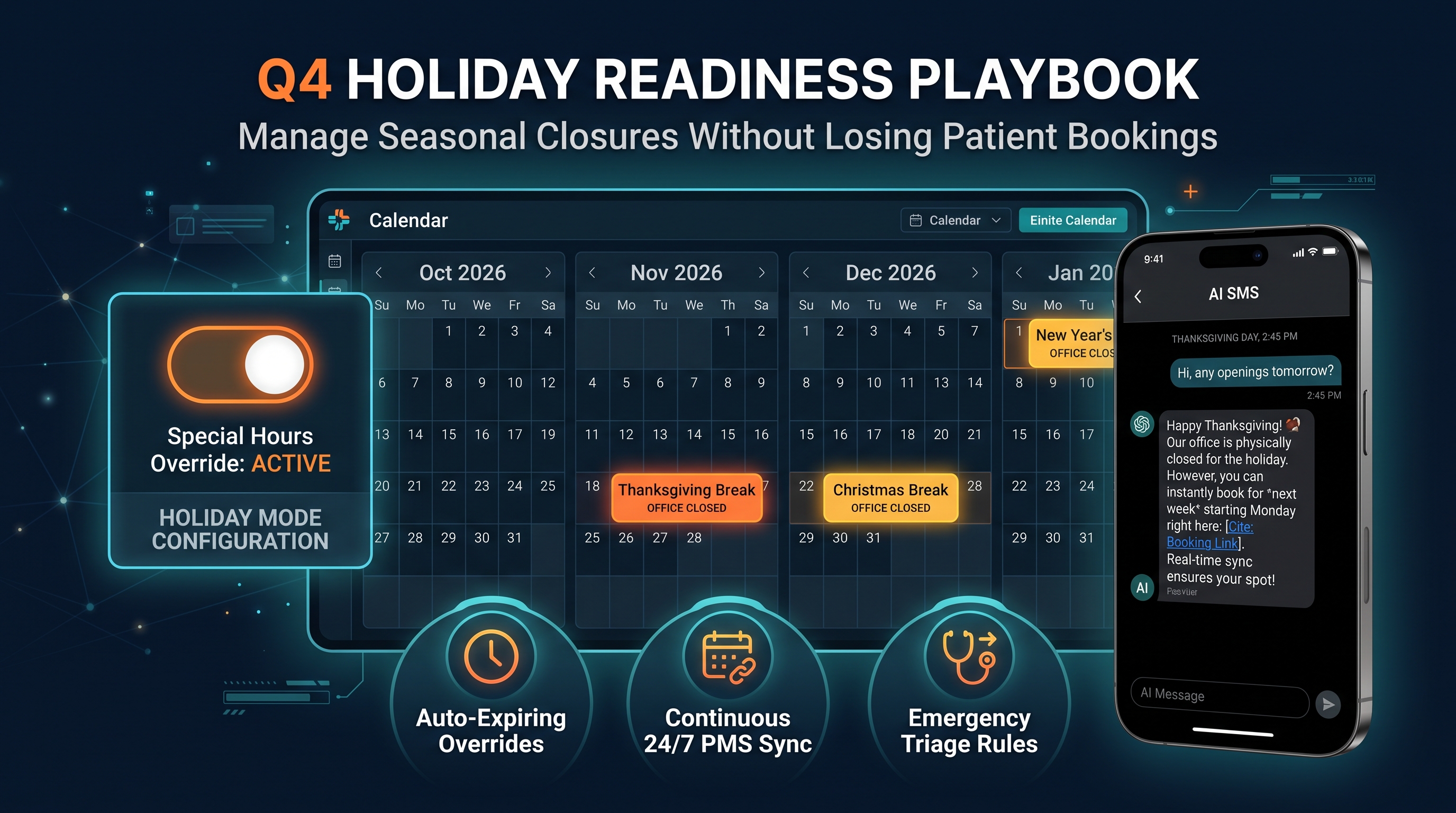
Rather than permanently modifying your master office schedule, configure temporary date-range overrides for upcoming holiday closures:
Columbus Day / Indigenous Peoples' Day: Monday, October 12, 2026
Veterans Day: Wednesday, November 11, 2026
Thanksgiving Break: Thursday, November 26 – Friday, November 27, 2026
Winter Holidays & New Year's: Wednesday, December 24, 2026 – Friday, January 1, 2027
Once programmed, the system automatically transitions into holiday mode on the selected start date and reverts to your standard operating schedule the second the override expires—requiring zero manual intervention on Monday morning.
2. Program Seasonally Adapted Scripting
When a holiday override is active, your AI receptionist dynamically updates its greeting across Voice, Interactive SMS, and Web Chat:
"Thank you for calling [Practice Name]! Our office is currently closed so our team can enjoy [Holiday Name] with their families. While our physical doors are closed, I can still help you schedule an appointment..."
This instantly sets caller expectations while reinforcing that care is still accessible.
3. Maintain Continuous 24/7 PMS Booking Write-Back
Even while physical desks are unstaffed, direct integration with practice management systems (Open Dental, Dentrix Ascend, Dentrix, and Eaglesoft) remains active. The AI verifies real-time provider availability and books future appointments for the following week while blocking out the holiday dates. Your team returns from the holiday break to a pre-filled appointment calendar.
4. Configure Emergency Triage & Triage Escalation
A broken tooth or acute pain on Thanksgiving morning cannot wait for standard business hours. During holiday overrides, the platform screens incoming calls for clinical urgency:
Routine Inquiries: Guided directly to automated future booking or digital intake form links.
Clinical Emergencies: Get real-time notifications instantly to your designated on-call doctor.
Holiday Automation Readiness Matrix
Operational Function | Static Answering / Voicemail | Smart Special Hours Override |
After-Hours Answering | Unmonitored inbox / Endless ring | 24/7 Warm Greeting & FAQs |
Holiday Calendar Sync | Requires manual setup & reset | Auto-expiring date range exceptions |
Appointment Capture | Delayed 48–72 hour callback lag | Real-time direct PMS booking write-back |
Emergency Routing | Generic "Call 911" voicemail prompt | Direct notification to designated on-call provider |